
TypeBoost
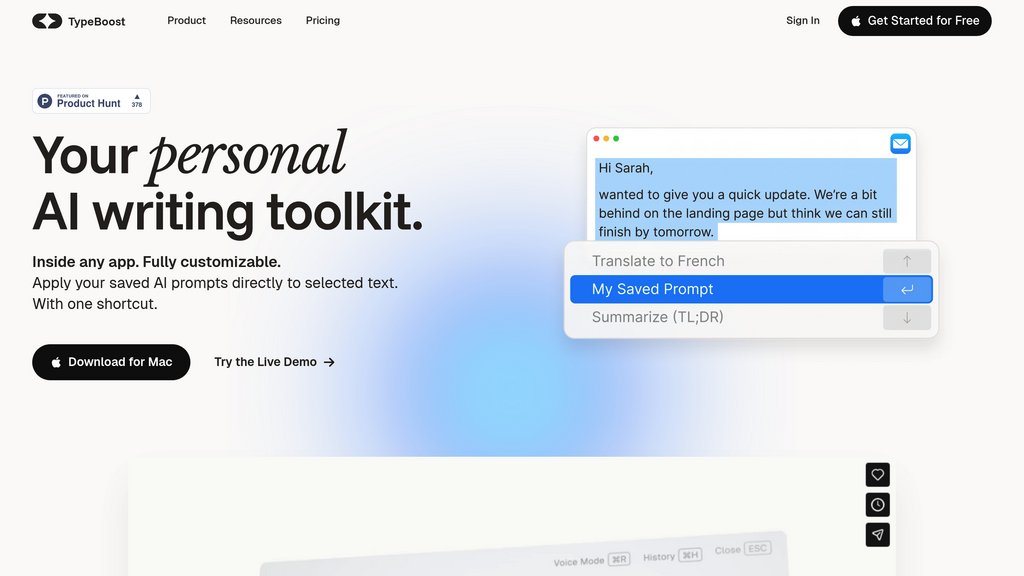
A macOS writing toolkit that lets you apply custom prompts to selected text inside any app — no copy-pasting, no context switching.
Community:

InsForge
An agent-native alternative to AWS. Run full-stack apps end to end via CLI and skills
Product Overview
What is TypeBoost?
TypeBoost is a macOS-native writing productivity tool that embeds directly into your existing workflow. Instead of jumping between your app and a separate AI tool, you simply select any text, trigger TypeBoost with a global keyboard shortcut, and apply your saved prompt actions instantly — right where you're working. It supports multiple AI model providers, voice input, granular accept/reject editing, and cross-device sync, making it a fully customizable personal writing system rather than just another AI assistant.
Key Features
In-App Text Actions
Apply saved prompt actions directly to selected text inside any macOS app via a global keyboard shortcut — no switching tabs or copy-pasting required.
Custom Prompt Library
Build and save your own reusable prompt actions tailored to your tone, style, and tasks. Prebuilt templates are also available to get started quickly.
Voice Mode
Dictate instructions or full content using voice input. TypeBoost converts spoken input into polished text, and also accepts freestyle voice commands on selected text.
Multi-Model Support
Pro users can choose from multiple AI model providers including OpenAI, Anthropic, and Google, giving flexibility to match the right model to the task.
Granular Edit Control
Review every AI-suggested change and accept or reject edits individually, keeping you in full control of your final output.
Cross-Device Sync
Prompts and history sync across Mac and iPhone via the cloud, so your personal writing toolkit follows you across devices.
Use Cases
- Email Writing : Professionals can instantly rewrite, polish, or tone-shift emails without leaving their inbox — select, trigger, done.
- Social Media Content : Marketers and creators can apply platform-specific prompt actions to draft LinkedIn posts, tweets, or captions directly inside the compose window.
- Multilingual Communication : Teams and global professionals can translate or localize text on the fly across 95 languages without switching to a separate translation tool.
- Document Editing : Writers working in Notion, Google Docs, or any text editor can refine, summarize, or expand content using custom prompts without breaking focus.
- Voice-First Workflows : Users who think faster than they type — executives, founders, commuters — can dictate ideas and have them transformed into structured, ready-to-send content.
FAQs
TypeBoost Alternatives

Goldfish
A lightweight Mac companion that remembers your work context across all apps and writes responses in your own tone — no copy-pasting or re-explaining required.

Kerlig
Mac-native writing assistant that integrates AI seamlessly into any app for fast, accurate text editing, summarization, and multilingual communication.

Clico
A free Chrome browser extension that supercharges every text field with contextual writing assistance, page summarization, and voice input.

Microsoft Copilot
Microsoft's everyday assistant that brings conversational chat, creative generation, and deep productivity integration together across web, Windows, and Microsoft 365.

MaxAI
A browser-based assistant that brings multiple top AI models into a single sidebar, helping users read, write, research, and communicate faster without switching tabs.

Voilà AI
A versatile AI assistant that integrates seamlessly into browsers and apps to boost productivity through writing, brainstorming, summarizing, and automating tasks.

WriteMail.ai
AI-powered email writing assistant that helps users compose professional, clear, and engaging emails faster with customizable tone and multilingual support.

Cotypist
System-wide smart autocomplete for Mac that predicts your next words inline, runs entirely on-device, and works across every app you already write in.
Analytics of TypeBoost Website
🇺🇸 US: 100%