
Clico
A free Chrome browser extension that supercharges every text field with contextual writing assistance, page summarization, and voice input.
Community:


Product Overview
What is Clico?
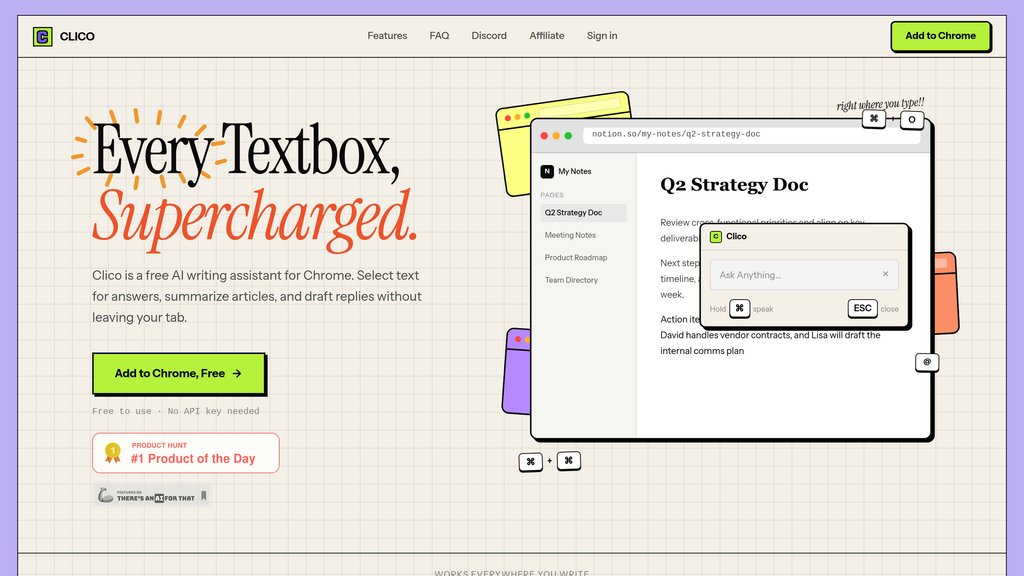
Clico is a browser extension for Chrome and Chromium-based browsers that brings writing assistance directly into any text field across the web. Without switching tabs or copying context, users can draft replies, summarize articles, ask questions about any page, and dictate via voice — all triggered by a simple keyboard shortcut. Clico reads the visible page content to stay contextually aware, and can also reference any open browser tab as additional context. It requires no API key and is free to use during beta.
Key Features
In-Page Writing Assistant
Activate with a keyboard shortcut inside any text field on any website to draft replies, compose messages, or generate content without leaving the current tab.
Page Summarization
Double-tap the shortcut to instantly get a structured summary of whatever article or page you are reading, saving time on lengthy content.
Contextual Page Awareness
Clico reads the visible content of the active page automatically, so responses are relevant to what you are currently viewing — no manual copy-pasting needed.
Tab Memory with @ Reference
Type @ to pull context from any open browser tab directly into your prompt, letting Clico work across multiple documents or conversations at once.
Voice Input
Hold the Command key to speak instead of type — Clico transcribes your speech, understands the page context, and writes the appropriate response for you.
Inline Search & Lookup
Highlight any word or sentence on a page to get instant definitions, context, or search results without opening a new tab.
Use Cases
- Email & Messaging Replies : Professionals can draft fast, context-aware replies in Gmail, Slack, Discord, or WhatsApp directly inside the message field.
- Research & Reading : Students and researchers can summarize long articles, reports, or documentation in seconds to extract key takeaways without reading in full.
- Social Media & Content Writing : Creators writing on LinkedIn, Substack, Reddit, X, or Instagram can generate and refine posts without disrupting their workflow.
- Document Drafting : Users working in Google Docs or Notion can accelerate writing by prompting Clico with full page context to continue or expand sections.
- Multilingual Communication : Clico can assist users in composing replies in foreign languages, useful for international teams or cross-border communication.
FAQs
Clico Alternatives

Atomic Mail
A privacy-first encrypted email service with built-in AI tools for smarter, faster, and more secure communication — no ads, no tracking.

HyperWrite AI
AI-powered writing assistant offering personalized content generation, editing, and research tools to enhance writing productivity.

Voilà AI
A versatile AI assistant that integrates seamlessly into browsers and apps to boost productivity through writing, brainstorming, summarizing, and automating tasks.

WriteMail.ai
AI-powered email writing assistant that helps users compose professional, clear, and engaging emails faster with customizable tone and multilingual support.

Elephas
AI-powered personal knowledge assistant that organizes diverse data formats into a unified knowledge base and provides intelligent insights and writing support.

Filo Mail
An AI email client that transforms Gmail into an action-oriented system, automatically converting important messages into tasks while filtering out noise.

GMPlus
Chrome extension enhancing Gmail email writing with over 100 smart prompts, multilingual support, and customizable templates.

ParagraphAI
A versatile writing assistant offering seamless text creation, editing, replying, and summarizing across devices and languages.