
Zella
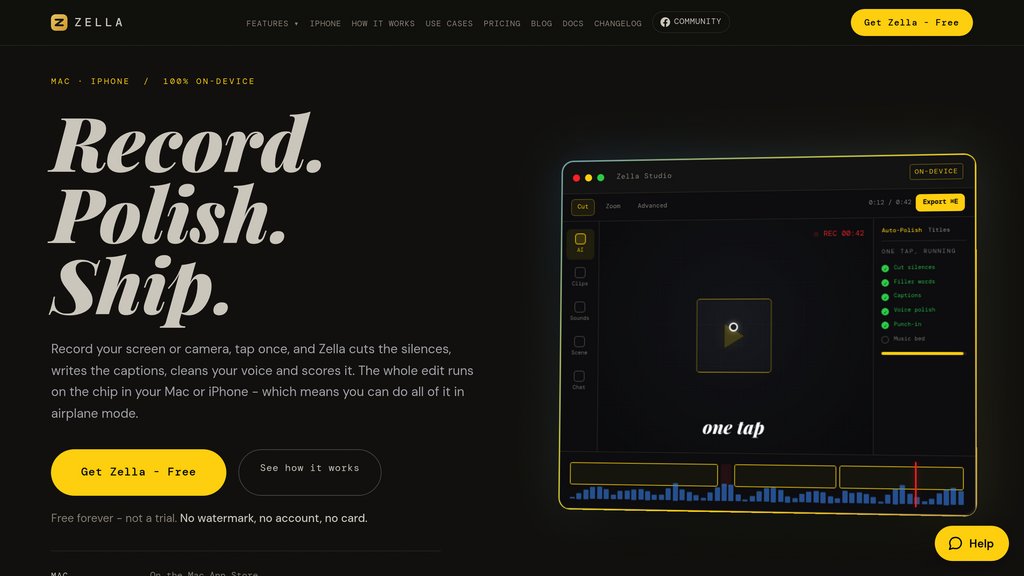
On-device screen recorder and video editor for Mac and iPhone that auto-cuts, captions, and polishes footage in one tap, free with no watermark.
Community:


Product Overview
What is Zella?
Zella is a screen recorder and video editor built for Mac and iPhone that runs entirely on-device, with no server, no account, and no upload step. Its signature Auto-Polish feature handles the editing work people normally pay an editor for: trimming silences and filler words, adding cross-dissolve cuts, generating keyword captions, cleaning up audio, writing a hook title, and applying emphasis zooms and mood-matched music, all in a single tap. Because every AI process runs locally, Zella works fully offline, even in airplane mode, and the free tier includes the complete editor and every AI feature with no watermark, capped only at 2-minute, 1080p exports. A one-time $89 purchase removes those export limits and unlocks Mac and iPhone together under one Apple ID, with no subscription required.
Key Features
One-Tap Auto-Polish
Automatically removes silences and filler words, adds cross-dissolve cuts, writes keyword captions, cleans noise, and applies emphasis zooms and ducking music in a single pass.
100% On-Device Processing
Recording, captioning, background removal, voice cleanup, and export all run on local hardware with no account or internet connection needed, functioning fully in airplane mode.
Background Removal Without a Green Screen
Cuts the subject out of any room and swaps in one of 40 backdrops live during recording, including in the iPhone viewfinder while filming.
AI Assistant for Natural-Language Edits
Typed prompts like 'cut the dead air and make it vertical' trigger up to 101 editing actions on Mac and 71 on iPhone, using the user's own API key.
Full Pro Editing Toolkit
A traditional timeline with ripple delete, J and L cuts, 50 levels of undo, plus 43 cinematic color-grade looks and LUT import for users who want manual control.
One-Click Platform Reframing
Reframes footage to 9:16, 1:1, or 16:9 with face tracking and exports with platform-specific presets ready for TikTok, Reels, Shorts, or YouTube.
Use Cases
- Short-Form Content Creation : Creators and social media managers turn raw talking-head or screen recordings into polished, caption-ready vertical videos for TikTok, Reels, and Shorts.
- Product Demos and Tutorials : Founders, SaaS teams, and support staff record and clean up screen walkthroughs without needing external editors or cloud-based tools.
- Podcast and YouTube Editing : Podcasters and YouTubers use Auto-Polish to trim dead air, add captions, and pace long-form recordings into publish-ready episodes.
- Privacy-Sensitive Video Work : Professionals handling confidential screen content rely on fully local processing to edit and export without ever uploading footage.
- Course and Training Videos : Educators and coaches record lessons on Mac or iPhone and use one-tap editing to produce clean, captioned instructional content quickly.
FAQs
Zella Alternatives
Vimeo
A complete video platform for hosting, creating, streaming, and monetizing high-quality videos — built for businesses, teams, and creators.

Medal.tv
Gaming clip platform that captures, edits, and shares gameplay moments instantly with friends and communities across PC and mobile.

Wistia
All-in-one video marketing platform for hosting, recording, webinars, and viewer analytics.

Goldcast
AI-first video campaign platform designed for B2B marketers to create, manage, and repurpose video content across the buyer journey.

Video Candy
Browser-based online video editor offering 70+ tools for editing, merging, compressing, and converting videos with flexible subscription plans.

Vmaker AI
AI-powered video creation and editing platform that transforms raw footage into polished videos with automated editing tools and screen recording capabilities.

quso.ai
All-in-one social media AI suite that streamlines content creation, editing, scheduling, and analytics for platforms like TikTok, Instagram, Facebook, and YouTube.

Vid.ai
AI-powered video creation and editing platform designed to simplify and accelerate professional-quality video production.