
Video Candy
Browser-based online video editor offering 70+ tools for editing, merging, compressing, and converting videos with flexible subscription plans.


Product Overview
What is Video Candy?
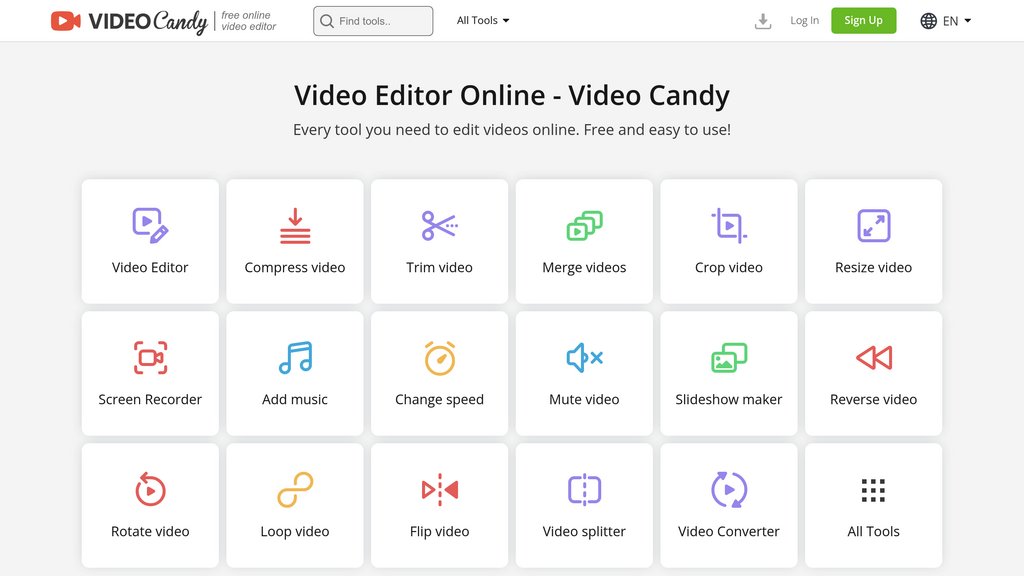
Video Candy is a comprehensive online video editing platform that eliminates the need for software installation or advanced technical skills. Accessible directly through a web browser, it provides users with an extensive suite of over 70 video editing tools for both basic and advanced editing tasks. The platform supports multiple video formats including MP4, MKV, and WebM, with the ability to handle files up to 8GB. Video Candy combines simplicity with functionality, allowing content creators, professionals, and casual users to produce high-quality edited videos without watermarks through paid subscription options.
Key Features
Comprehensive Video Editing
Trim, merge, crop, resize, and compress videos with intuitive controls. Add transitions, adjust video speed, mute or replace audio, and apply fade effects for professional results.
Multi-Format Support and Conversion
Convert videos between MP4, WebM, MKV formats and extract audio as MP3 or create GIF animations. Also includes audio file conversion for flexible content delivery.
Built-In Screen Recording
Capture screen activity with selectable options for entire screen, specific programs, or browser tabs. Record microphone audio and webcam simultaneously for tutorials and presentations.
Creative Content Tools
Create animated slideshows with transitions, build stop-motion animations, and generate GIF files. Flip, rotate, loop, and reverse videos for unique creative effects.
Flexible Subscription Plans
Choose from monthly ($8/month), yearly ($3/month billed annually), or lifetime ($79 one-time) plans. All paid tiers include no watermarks, unlimited downloads, and high-priority processing.
No Installation Required
Access all editing tools directly from any browser on desktop, tablet, or mobile devices. Upload videos from computer, phone, or cloud storage without downloading software.
Use Cases
- Social Media Content Creation : Content creators and influencers can quickly edit videos for TikTok, Instagram, YouTube, and other platforms with optimized video resizing tools and watermark-free outputs.
- Educational and Training Materials : Educators and trainers can record screen tutorials, edit instructional videos, and create engaging slideshows for online courses and learning materials.
- Professional Marketing Videos : Marketers and businesses can compress and optimize videos for email campaigns, merge multiple clips into polished presentations, and add music for brand consistency.
- Personal Video Projects : Individuals can edit personal videos, create memory slideshows, trim footage for archival, and convert between formats for sharing across different devices and platforms.
- Quick Screen Recording and Documentation : Professionals can record and edit screen captures for software demonstrations, bug reports, product walkthroughs, and remote communication without leaving the browser.
FAQs
Video Candy Alternatives

ChatCut
Intuitive video editing platform leveraging transcript-based editing for faster, collaborative content creation.

VidDay
Online platform for creating collaborative video montages and video gifts for memorable celebrations and special occasions.

Bitmovin
Comprehensive video streaming platform offering cloud encoding, playback, and analytics for live and on-demand content across diverse devices.

FireCut AI
AI-powered Adobe Premiere Pro plugin that automates tedious video editing tasks to accelerate the creation of the first cut.

Detail
Complete iOS and iPad video studio that transforms how creators shoot, edit, and share content through intelligent automation and intuitive tools.

Shred Video
Automated cinematic video and photo creation system for adventure tours, delivering instant, shareable media with minimal staff effort.

Mindstamp
Interactive video platform that transforms any video into an engaging, personalized experience with clickable elements, questions, and branching logic.

Odysser
Instant animation platform that transforms raw videos into polished, branded content through automated context-aware editing.