
Tolaria
Local-first desktop app for managing Markdown knowledge bases with Git sync and native Claude Code integration via MCP.
Community:


Product Overview
What is Tolaria?
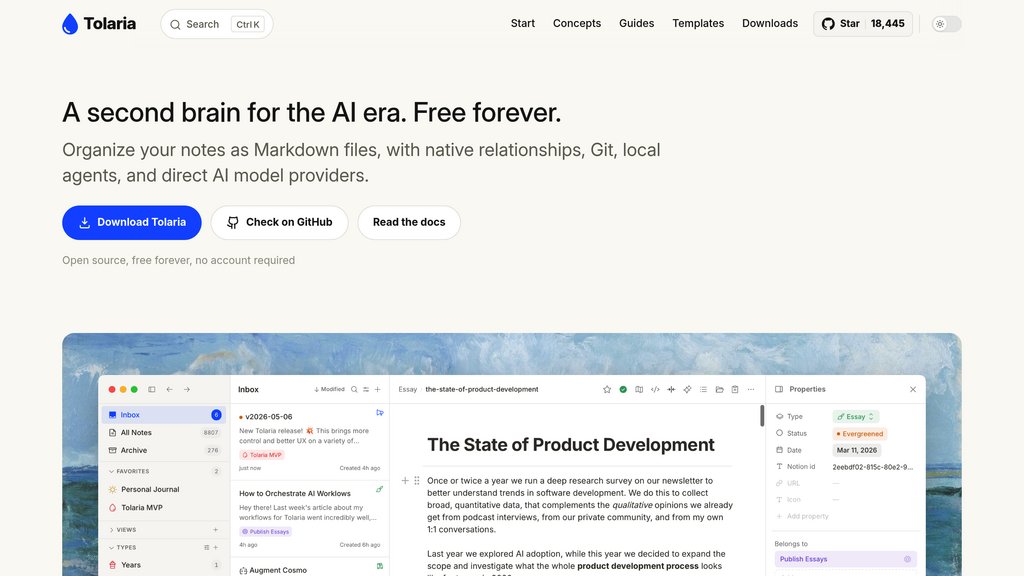
Tolaria is a free, open-source desktop app that turns a folder of plain Markdown files into a fully navigable second brain. Every note stays as a standard Markdown file with YAML frontmatter, so there is no proprietary database or lock-in and any external tool, editor, or terminal can read the same files directly. Built with Tauri, React, and Rust, Tolaria pairs a block-based editor with native Git version control and a built-in MCP server, letting coding agents like Claude Code and Codex inspect and edit the vault directly. It runs on macOS, Windows, and Linux, requires no account or subscription, and is distributed under the AGPL-3.0 license.
Key Features
Plain Markdown Storage
Notes are stored as standard .md files with YAML frontmatter, avoiding proprietary formats or hidden databases so any external tool can read them.
Native Git Integration
Every vault behaves like a Git repository, giving users built-in version history and sync without extra plugins or services.
Built-in MCP Server
An embedded Model Context Protocol server lets AI coding agents such as Claude Code, Codex, and OpenCode read, search, and edit the vault directly.
Block-Based Editor
Rich editing mode with slash commands, wikilinks, and drag-and-drop media, alongside a raw Markdown mode for exact file control.
Lightweight Native Performance
Built on Tauri with a Rust core instead of a bundled Chromium runtime, giving fast startup and low memory usage compared to Electron-based apps.
Cross-Platform Availability
Desktop builds for macOS, Windows, and Linux, installable via direct download or Homebrew cask, with no account required.
Use Cases
- AI-Augmented Research : Researchers and writers can let Claude Code query years of accumulated notes to summarize topics or surface linked references.
- Personal Knowledge Management : Individuals organizing thousands of notes benefit from native relationships, wikilinks, and a type system for navigation.
- Version-Controlled Note-Taking : Teams or individuals who want auditable history and sync can rely on Git tracking every change to their vault automatically.
- Agent-Assisted Content Drafting : Writers can direct an AI agent to draft new pieces based on linked notes already stored in the vault.
- Migrating from Proprietary Tools : Users leaving cloud-locked apps like Notion can move to a local, file-based system without losing data portability.
FAQs
Tolaria Alternatives

Lazy.so
A seamless knowledge capture tool that enables quick note-taking and content clipping from anywhere on your computer without interrupting your workflow.

Hoarder
Self-hostable bookmark-everything app with AI-powered automatic tagging, full-text search, and multi-format content saving.

Reflect
AI-powered note-taking app that organizes thoughts through backlinks, integrates calendars, and secures data with end-to-end encryption.

Mem AI
AI-powered note-taking and knowledge management app that organizes and retrieves information effortlessly.

Capacities
A networked note-taking and knowledge management studio that integrates AI assistance, calendar syncing, and offline capabilities for seamless productivity.

Obsidian
A privacy-first note-taking application that transforms unstructured notes into an interconnected knowledge system through markdown-based linking and visualization.

Saner.AI
AI-powered productivity assistant designed to help ADHDers and knowledge workers organize notes, tasks, and information seamlessly.

Cubox
Comprehensive reading and research platform for collecting, organizing, and analyzing digital content with advanced annotation capabilities.