
SurfMind
A browser sidebar that brings page-aware chat, multi-tab research, and flexible model access into everyday web workflows.
Community:

Product Overview
What is SurfMind?
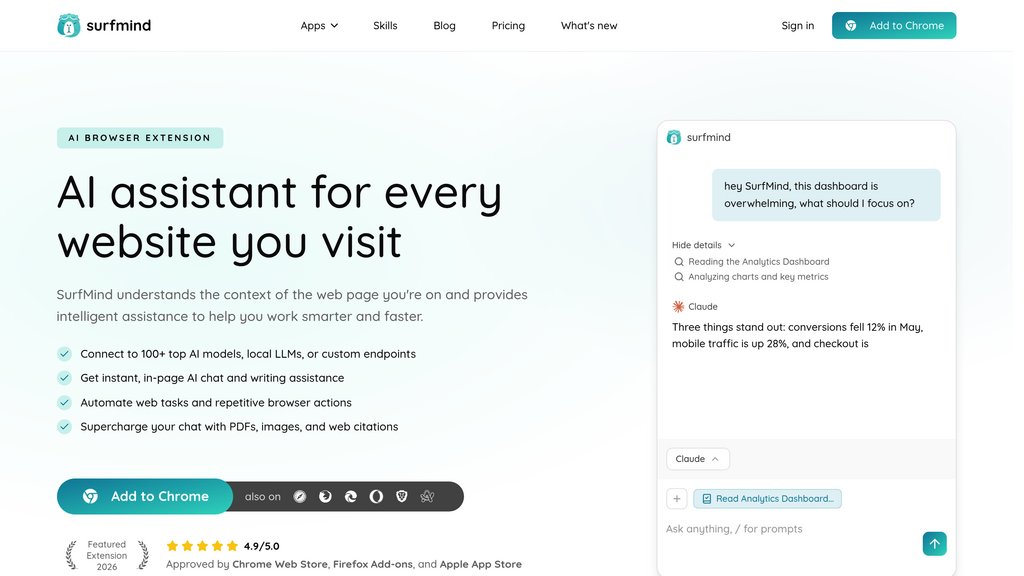
SurfMind is a browser extension that places a context-aware assistant beside any website. It can read the active page, answer questions about selected content, summarize long materials, and help draft or refine text without requiring users to switch tabs. The platform supports over 100 hosted, local, and custom models, while also handling PDFs, images, and multi-page research. For more hands-on workflows, its browser agent can perform permitted actions such as opening pages, scrolling, clicking, and typing.
Key Features
Page-Aware Sidebar
Opens beside the current webpage and uses page context to answer questions, explain content, and assist with writing.
Multi-Page Research
Brings multiple open pages or tabs into one conversation for source comparison, fact extraction, and consolidated research.
Flexible Model Access
Connects to more than 100 models, including hosted providers, OpenRouter options, local LLMs, and custom OpenAI-compatible endpoints.
In-Page Quick Actions
Lets users highlight text to summarize, translate, explain, rewrite, or move selected content into a longer chat.
File and Image Context
Supports PDFs, text files, code, CSVs, screenshots, and images as additional context for chat-based analysis.
Browser Agent and MCP
Can take permission-based browser actions and connect to approved tools or data sources through MCP servers.
Use Cases
- Web Research : Compare information across articles, product pages, documentation, and search results without manually consolidating notes.
- Reading and Learning : Turn dense articles, technical papers, and unfamiliar concepts into concise explanations, summaries, and follow-up answers.
- Writing Assistance : Draft, revise, translate, or adapt emails, social posts, reports, and replies based on the page and selected text.
- Developer Support : Explain code snippets, APIs, error messages, and technical documentation while keeping the relevant page in context.
- Browser Task Automation : Handle repetitive web actions such as navigation, scrolling, clicking, and typing after the user grants permission.
FAQs
SurfMind Alternatives

Arena
Community-driven platform for benchmarking and comparing frontier AI models through side-by-side evaluations and human voting.

Duck.ai
Privacy-focused AI chatbot integrated with DuckDuckGo, offering multi-model conversational AI without tracking or data logging.

Sider AI
A versatile AI-powered browser extension and app that integrates multiple advanced AI models to assist with reading, writing, data analysis, and multimedia interaction across platforms.

iAsk.Ai
Advanced AI-powered search engine delivering instant, accurate, and context-aware answers through natural language queries.

LM Arena (Chatbot Arena)
Open-source, community-driven platform for live benchmarking and evaluation of large language models (LLMs) using crowdsourced pairwise comparisons and Elo ratings.

TLDR This
AI-powered web tool that automatically condenses long texts into concise, clear summaries with metadata extraction and distraction-free reading.

AndiSearch
AI-powered conversational search assistant delivering direct, personalized, and privacy-focused answers with real-time data integration.

Distill
Company intelligence platform that monitors news, official channels, and LinkedIn updates for the organizations and industries you follow.