
Pixelmator Pro
Ein leistungsstarker, exklusiv für Mac entwickelter Bildeditor, der professionelle Fotobearbeitung, Grafikdesign, Malerei und KI-gestützte Werkzeuge in einer eleganten, nativen Oberfläche vereint.
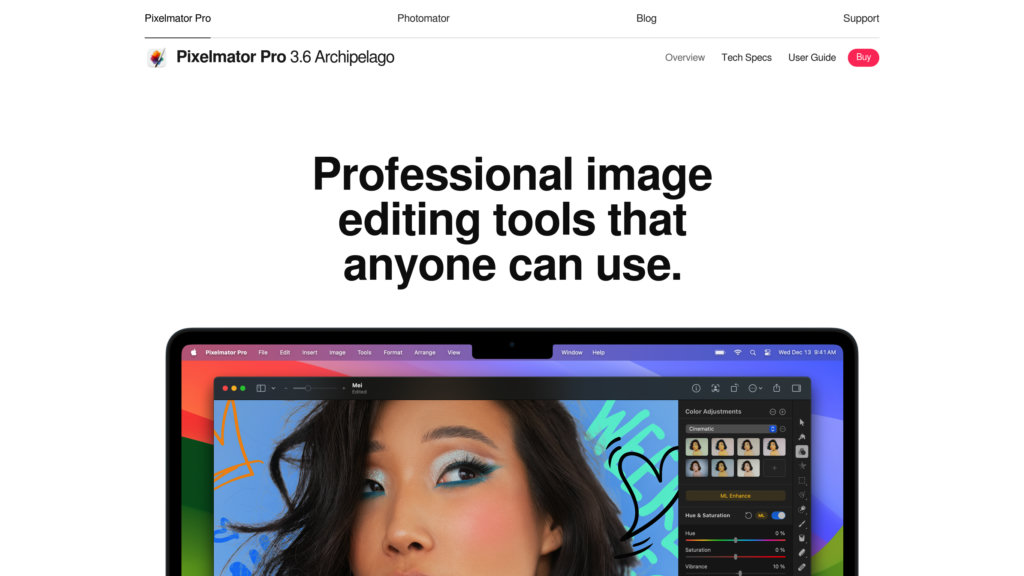


Produktübersicht
Was ist Pixelmator Pro?
Pixelmator Pro ist eine umfassende Bildbearbeitungssoftware, die exklusiv für macOS entwickelt wurde, optimiert für Apple Silicon und mit modernen Apple-Technologien wie Metal und Core ML gebaut. Sie bietet eine breite Palette an Werkzeugen für Fotoverbesserung, Vektorgrafikdesign, digitales Malen und Layout-Erstellung. Mit KI-gestützten Funktionen wie Hintergrundentfernung, Super-Resolution und automatischer Farbanpassung ermöglicht Pixelmator Pro sowohl Einsteigern als auch Profis effizientes Arbeiten in einer einzigen, intuitiven Oberfläche. Unterstützt über 750 RAW-Formate, PSD-Dateien mit Ebenen sowie zahlreiche weitere Bild- und Videoformate und ist damit ein vielseitiges Werkzeug für kreative Workflows auf dem Mac.
Hauptfunktionen
KI-gestützte Bearbeitungswerkzeuge
Enthält maschinelles Lernen für automatische Hintergrundentfernung, Super-Resolution, Rauschreduzierung und Farbkorrektur zur Optimierung der Fotobearbeitung.
Umfassende Bild- und Grafikbearbeitung
Bietet über 50 Bildbearbeitungswerkzeuge, Vektorgrafikfunktionen, Ebenenstile und anpassbare Typografie für komplexe Designs und Illustrationen.
Fortschrittliche Maskierungs- und Auswahlwerkzeuge
Intuitive Maskierungssteuerung mit KI-Hintergrundmasken, Vektormaskenunterstützung und präzisen Auswahlwerkzeugen wie Schnellauswahl und Magnetische Auswahl.
Umfangreiche Dateiformatunterstützung
Unterstützt RAW-Bilder von über 750 Kameras, PSD mit Ebenen, SVG, PDF, HEIF und gängige Videoformate für nahtlosen Import und Export in Arbeitsabläufen.
Optimiert für macOS und Apple Silicon
Nativ für Mac entwickelt mit Metal-Grafikbeschleunigung, Core ML-Integration und voller Kompatibilität zu macOS-Features wie iCloud Drive und Kurzbefehle.
Nicht-destruktive Bearbeitung und Ebenenverwaltung
Ermöglicht flexible, nicht-destruktive Workflows mit Farbanpassungsebenen, Mischmodi, Transparenzsteuerung und organisierter Ebenenverwaltung.
Anwendungsfälle
- Professionelle Fotobearbeitung : Verbessern und retuschieren Sie Fotos mit KI-gestützten Werkzeugen, präzisen Farbanpassungen und RAW-Unterstützung für hochwertige Bilder.
- Grafikdesign und Layout-Erstellung : Gestalten Sie Poster, Social-Media-Grafiken und Branding-Materialien mit Vorlagen, Vektorwerkzeugen und anpassbarer Typografie.
- Digitales Malen und Illustration : Erstellen Sie detaillierte digitale Kunstwerke mit handgefertigten Pinseln, drucksensitiver Tablet-Unterstützung und einer reaktionsschnellen Mal-Engine.
- Maskierung und Hintergrundentfernung : Isolieren Sie Motive und entfernen Sie Hintergründe schnell mit fortschrittlichen KI-Maskierungsfunktionen für Compositing und Design.
- Multi-Format-Content-Produktion : Arbeiten Sie nahtlos mit Bildern und Videos in verschiedenen Formaten, einschließlich PSD-Dateien mit Ebenen, für vielfältige kreative Projekte.
Häufig gestellte Fragen
Pixelmator Pro Alternativen

Bigjpg
KI-gestütztes Bildvergrößerungstool, das Bilder bis zu 16× vergrößert und dabei Schärfe bewahrt und Rauschen reduziert.

Radiant Photo
KI-gestützte Fotobearbeitungssoftware, die Bilder automatisch und präzise verbessert und dabei natürliche Details und Farben bewahrt.

Polarr
KI-gestützte Foto-Bearbeitungsplattform für Amateur- und Profifotografen zur effizienten Optimierung und Verwaltung von Bildern.

UpscalePics
KI-gestütztes Tool zur Bildvergrößerung und -verbesserung, das Fotos bis zu 256 MP vergrößert, Qualität bewahrt und Rauschen entfernt.

AI Outpainting
KI-gestütztes Online-Tool, das Bilder nahtlos in mehrere Richtungen erweitert und verbessert, während der ursprüngliche Stil und die Qualität erhalten bleiben.

Luminar Brush
KI-gestütztes Bildbearbeitungstool zur Verbesserung von Lichteffekten in Fotos.

360智图
Umfassende Bildplattform mit Zugang zu Stockfotos, intelligenten Bearbeitungstools und Generierungsfunktionen auf Basis eines Bean-Credit-Systems.

AlterMe
KI-gestützte, personalisierte Foto-Editing-App, die AWS-Infrastruktur für fortschrittliche Bildverbesserung und Anpassung nutzt.