
cmux
Ein natives macOS-Terminal für Multitasking mit Coding-Agents, mit vertikalen Tabs, geteilten Bereichen, einem eingebetteten Browser und einer Socket-API.
Community:
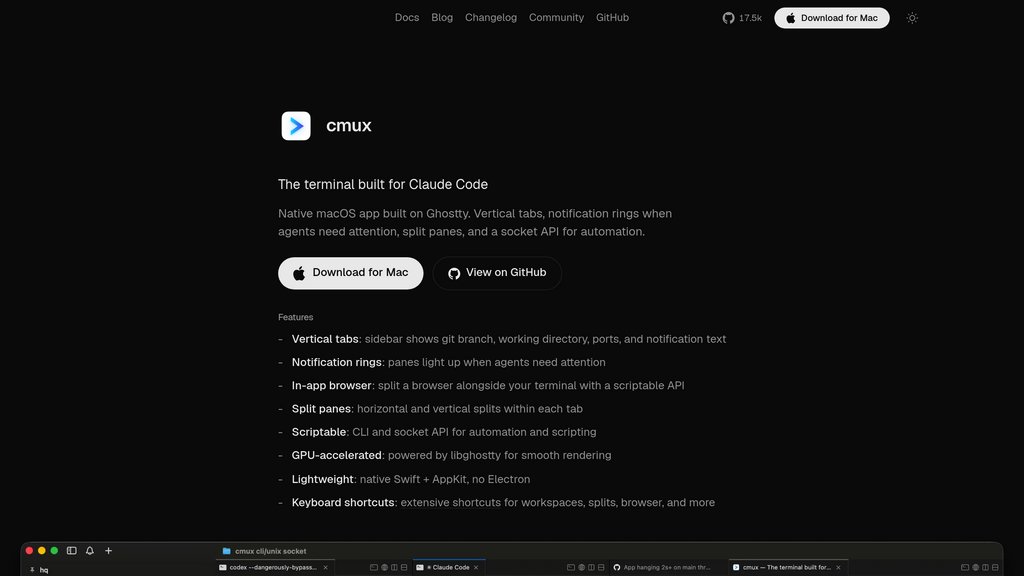


Produktübersicht
Was ist cmux?
cmux ist eine native macOS-Terminal-Anwendung, die von Manaflow entwickelt wurde und auf libghostty aufbaut — der Rendering-Engine hinter Ghostty — anstatt ein Fork davon zu sein. Es wurde speziell für Entwickler entwickelt, die mehrere KI-Coding-Agents gleichzeitig ausführen, wie Claude Code, Codex, Gemini CLI, Aider und andere. In Swift und AppKit geschrieben, ist cmux leichtgewichtig, GPU-beschleunigt und benötigt keine Konfigurationsdateien oder Präfix-Tasten. Es geht über ein herkömmliches Terminal hinaus, indem es einen integrierten Browser, Benachrichtigungsringe für Agent-Aufmerksamkeit und eine vollständig skriptfähige CLI und Socket-API bietet. cmux ist kostenlos und Open Source.
Hauptfunktionen
Vertikale Tab-Seitenleiste
Jeder Tab in der Seitenleiste zeigt den aktuellen Git-Branch, das Arbeitsverzeichnis, offene Ports und Benachrichtigungstext an und gibt Entwicklern einen klaren Überblick über alle aktiven Sitzungen auf einen Blick.
Agent-Benachrichtigungsringe
Visuelle Benachrichtigungsringe warnen Entwickler, wenn ein Coding-Agent auf Eingaben wartet, und verhindern, dass inaktive Agents beim Multitasking unbemerkt bleiben.
Geteilte Bereiche
Unterstützt sowohl horizontale als auch vertikale Teilungen innerhalb jedes Tabs und ermöglicht nebeneinander liegende Terminal-Sitzungen oder ein Terminal gepaart mit dem integrierten Browser.
In-App-Browser
Ein eingebetteter Browser kann neben dem Terminal mit einer skriptfähigen API angezeigt werden, wodurch das Wechseln zwischen Apps beim Nachschlagen von Dokumentation oder Vorschau von Ausgaben entfällt.
Skriptfähige CLI und Socket-API
Vollständige Automatisierungsunterstützung über eine CLI und Socket-API — erstellen Sie Arbeitsbereiche, verwalten Sie Tabs, teilen Sie Bereiche, senden Sie Tastenanschläge und öffnen Sie URLs programmatisch.
Leichte native Leistung
Gebaut mit Swift und AppKit mit GPU-Beschleunigung über libghostty vermeidet cmux den Electron-Overhead für eine schnelle, ressourceneffiziente Erfahrung.
Anwendungsfälle
- Multi-Agent-Entwicklung : Entwickler, die mehrere KI-Coding-Agents (z. B. Claude Code, Codex, Aider) parallel ausführen, können alle Sitzungen aus einem einzigen Fenster mit klaren visuellen Hinweisen zum Agent-Status überwachen.
- Terminal-Automatisierung und Skripting : DevOps-Ingenieure und Power-User können komplexe Workflows automatisieren, indem sie die Erstellung von Arbeitsbereichen, Bereichsverwaltung und Tastenanschlag-Injektion über die Socket-API skripten.
- Dokumentation neben dem Codieren : Entwickler können das Terminal und den integrierten Browser nebeneinander teilen und API-Dokumentation oder Web-Vorschauen referenzieren, ohne die Coding-Umgebung zu verlassen.
- Multi-Projekt-Arbeitsbereichsverwaltung : Teams oder einzelne Entwickler, die mehrere Projekte gleichzeitig verwalten, profitieren vom Kontext auf Tab-Ebene (Branch, Verzeichnis, Ports), um in allen Arbeitsbereichen orientiert zu bleiben.
Häufig gestellte Fragen
cmux Alternativen

Prime Intellect
Full-Stack-Plattform zum Trainieren, Evaluieren und Deployen individueller KI-Modelle mit integriertem Compute, RL-Umgebungen und Inferenz.

Lakera AI
Fortschrittliche KI-Sicherheitsplattform mit Echtzeit-Bedrohungserkennung, Prompt-Injection-Abwehr und Compliance-Kontrollen für generative KI-Anwendungen.

Tessl
Ein Paketmanager für Agent-Fähigkeiten und -Kontext, der Teams ermöglicht, Kontext für agentische Softwareentwicklung zu erstellen, zu bewerten, zu versionieren und zu verteilen.

Turnkey
Turnkey bietet eine sichere, skalierbare und flexible Wallet-Infrastruktur mit nahtlosem Private-Key-Management und Onchain-Automatisierung durch eine einheitliche API.

exe.dev
Infrastrukturplattform für Entwickler mit persistenten Linux-VMs, temporären Sandboxes und einem integrierten Web-Coding-Agent.

One
Agent-Infrastrukturplattform, die 84.000+ Open-Source-Tools über 500+ Apps mit verwalteter Authentifizierung und Kontextoptimierung bereitstellt.

Arcjet
Runtime-Security-Plattform, die KI-Agents, Tools, APIs und Webanwendungen im Moment der Aktion schützt.

Infinity by ProjectX
Cloud-natives Betriebssystem, das anspruchsvolle Anwendungen wie Blender, VS Code und Isaac Sim mit dedizierter GPU pro App direkt in jedem Browser ausführt.