

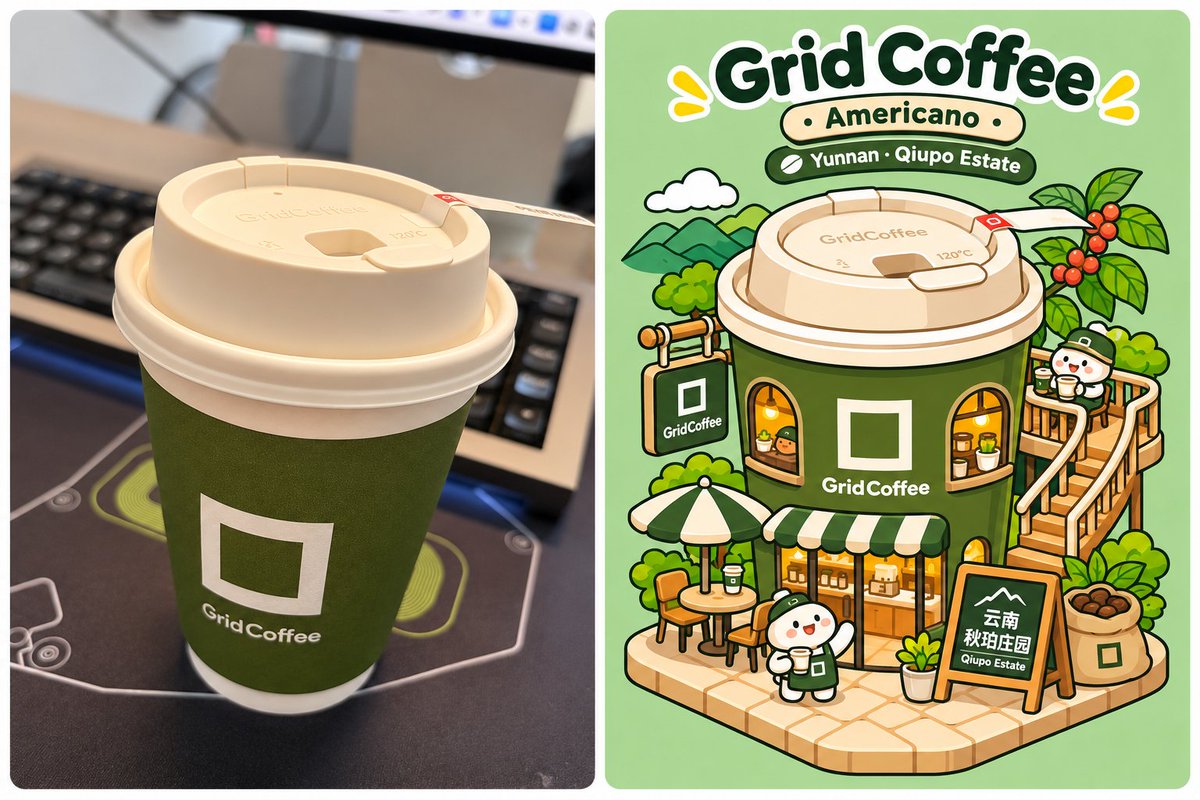
Beverage Photo → Isometric Miniature Building Illustration Based on the real beverage photo I upload, transform the coffee, milk tea, or other drink in the image into a cute brand-themed miniature building using a 2D isometric flat-vector illustration style with bold black outlines. Finally, use code to combine the original photo and the generated illustration into a complete high-resolution comparison image. User-provided information Brand name: [Optional; if blank, identify it automatically from the photo] Beverage name: [Optional; if blank, identify it automatically from the photo] Collaboration information: [Optional; ignore if none] Other characteristics: [Optional; for example, coffee-bean origin, estate name, or special ingredients] Assume the user will upload one beverage photo. Prioritize identifying the brand logo, packaging, colors, cup shape, text, and beverage characteristics shown in the image. If the user provides explicit information, treat it as authoritative. Do not invent anything that cannot be confirmed. Original-image reference and silhouette fidelity — highest priority The user’s real uploaded photo must be used directly as the visual reference for image-to-image creation. Do not redesign a cup based only on the written description. Let the image model directly observe and understand the main silhouette in the source image. There is no need to use code to extract edges or generate line art beforehand. Preserve especially: Cup silhouette: the width-to-height ratio, top-wide and bottom-narrow shape, and any distinctive bottle or can geometry. Top structure: lid thickness, rim shape, straw position, milk foam, whipped cream, and related features. Packaging characteristics: brand logo, primary colors, label placement, special patterns, and text layout. Beverage details: liquid color, layers, ice, tapioca pearls, fruit, coffee beans, cookie crumbs, and similar ingredients. Distinctive identifiers: collaboration characters, mascots, special stickers, and decorations. Use the original container silhouette as the foundation for the illustrative and architectural transformation so the generated building remains instantly recognizable as the drink in the photo. Do not arbitrarily replace the cup type, change the brand colors, or redesign the packaging. However, do not mechanically copy the source photo’s camera angle. Preserve the original form while making a reasonable three-dimensional spatial interpretation. Core principle: preserve the original beverage’s identifying features while redesigning its architectural function. Isometric miniature-building design Transform the beverage packaging into a playful brand-themed Isometric Miniature Diorama. Use an Elevated Three-Quarter Isometric View, looking from approximately 45 degrees diagonally in front of the building and about 30 degrees downward. The top, front, side, and spatial depth of the base must all be clearly visible. Do not use a completely front-facing product-display view. Architectural requirements: Use the original cup or container as the main body of the building, preserving its shape and iconic packaging characteristics. Naturally convert the lid, milk foam, and beverage ingredients into roofs, platforms, terraces, or playful architectural ornaments. Design round windows, an entrance, shop windows, balconies, and related features on the cup body. Add stairs, a blue slide, observation decks, awnings, hanging signs, and other facilities according to the spatial structure. Include cute cartoon mascots drinking beverages, playing, using the slide, or looking out of the windows. Surround the building with potted plants, vines, flowers, grass, and other greenery to create a soothing miniature landscape. Add drink-related elements such as coffee trees, coffee cherries, cookies, oranges, tea leaves, or tapioca pearls. If special origin, estate, or collaboration information is available, integrate the related visual motifs into the environment. All decorations must be developed around the brand and beverage characteristics. Do not mechanically repeat the same building layout every time. Place the entire building on an angled base with clear isometric perspective, logical spatial construction, and rich visual layering. Illustration style — follow strictly Bold Outline Isometric Flat Vector Illustration Use a professional 2D isometric flat-vector illustration style, not a 3D cartoon render. Outlines: Use clear, even, relatively thick black outlines — Thick Consistent Black Outlines. The outer silhouette should be slightly thicker than the interior details. Use rounded corners and smooth, flowing lines. Colors: Use clean, bright, high-purity Solid Flat Color Fills. Apply broad flat-color areas, using only a small number of adjacent shades on each object to describe its structure. Shadows: Allow only a small amount of Minimal Hard-Edged Flat Shading with clearly defined boundaries. Do not use visible gradients, realistic reflections, or complex lighting. Shapes: Use simple, rounded geometric forms with cute proportions and a playful, toy-like quality while preserving the feel of a purely two-dimensional vector illustration. Background: Use a bright, soft mint-green background or another clean background color coordinated with the brand’s primary colors. A small number of flat decorative clouds, stars, plants, or similar elements may be added. Overall quality: Create a refined commercial brand-IP illustration poster with a clean image, harmonious colors, clear spatial relationships, and rich but not excessive detail. The result should look like a professional vector illustration created by a designer in Adobe Illustrator, not a three-dimensional scene rendered in Blender or Cinema 4D. Strictly avoid: 3D Rendering, Photorealistic, Plastic Texture, Glossy Highlights, Soft Gradients, Realistic Lighting, Complex Shadows, Metallic Reflections, Painterly Texture, Watercolor, and Oil Painting. Text and title layout Design a complete English brand title at the top of the illustration. Main title: the English brand name, such as GRID COFFEE, ChaBaiDao, or FANTA. Subtitle: the English beverage name, such as Americano or Caramel Cookie Latte. Supplementary information: if there is a collaboration, coffee estate, special origin, or similar information, add one smaller line of English text. Text requirements: Use a rounded, heavy, bold sans-serif typeface — Rounded Bold Sans-serif. Use solid-colored text, optionally paired with a simple white outline. Do not use complex typographic effects such as three-dimensional extrusion, embossing, metallic finishes, or gradients. Make the main brand title prominent and keep the subtitle clear without allowing it to overpower the subject. Leave at least approximately 8% safe space between the title and the top edge of the canvas. Maintain comfortable whitespace between the title and the building. Do not let the text touch the cup lid. Aspect ratio and composition First generate one independent, complete illustration. Do not ask the AI to directly generate a split comparison image. Choose the canvas based on the orientation of the source photo: Vertical source: generate a vertical 3:4 illustration. Horizontal source: generate a horizontal 4:3 illustration. Square source: generate a 1:1 illustration. Special aspect ratios may be adapted flexibly when necessary. Composition requirements: All buildings, stairs, slides, characters, plants, and the base must appear completely within the frame. Leave approximately 6%–8% safe space between the main subject and the left, right, and bottom edges of the canvas. Leave sufficient room between the top text and the edge of the canvas. Do not crop any important architectural structure or decoration. Do not enlarge the subject excessively merely to fill the frame. Do not stretch, squash, or crop the content simply to meet an aspect-ratio requirement. Plan the complete composition before generation rather than forcibly cropping it to the target ratio afterward. Automatic compositing with code After the independent illustration is complete, use Python Pillow or a similar tool to combine the images. Compositing rules: Vertical original photo: place the original on the left and the illustration on the right. Horizontal original photo: place the original on top and the illustration below. Square original photo: use a side-by-side layout by default. Compositing requirements: The real original photo uploaded by the user must be used. Do not replace it with an AI-redrawn version of the photo. Do not crop, stretch, or alter the content of the original photo. Scale proportionally so the two images align naturally. If their aspect ratios differ, use background padding to adapt them instead of forcibly cropping either image. An appropriate white gap may be added between the two images. Keep the illustration complete, and ensure that all titles and architectural elements remain within the boundaries. Export a high-resolution PNG image. Final output Complete the entire creative workflow directly without requesting step-by-step confirmation from the user. Provide two finished files: 1. Complete independent illustration PNG A genuinely complete isometric miniature-building illustration, not an image cropped from the side-by-side comparison. 2. Original photo + illustration composite PNG Use code to combine the real original photo and the generated illustration into one complete image. Prioritize displaying the composite comparison image and provide both high-resolution image files. Most important execution principle: Use the original image directly as the visual reference → preserve the original cup shape and packaging silhouette → transform it into an elevated three-quarter isometric building → use bold black outlines and solid flat vector colors → generate a complete independent illustration → combine it with the real original photo through code without cropping. The final result should make the original beverage instantly recognizable while also creating the delightful surprise that it has become a refined, cute, and lively miniature building.