

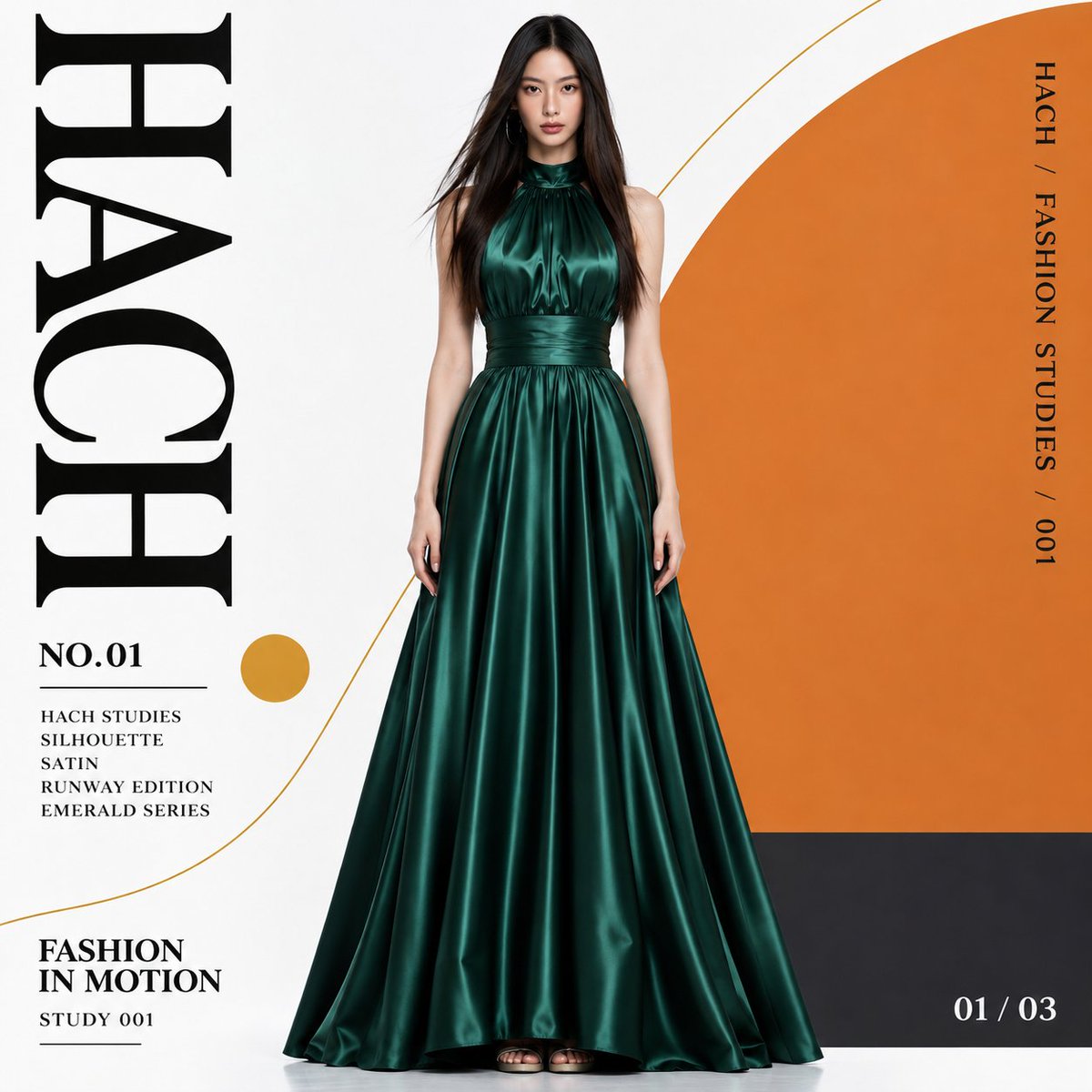
【User inputs】 1. Mode: Poster/Anchor. 2. Aspect ratio: 1:1/3:4. 3. Title: HACH MODE. Show the title only in Poster mode. Attach a full-body person reference. These are runtime choices and the original instructions need not be edited. If unspecified, use Poster, 3:4, and FORM. 【Objective】 Redress the woman in the supplied person reference in the specified satin gown, then use the same person and outfit to create either a poster or a video anchor image. 【References】 The full-body person image defines the face, hair, skin tone, apparent age, build, and body proportions. The clothing reference supplies only the form and material of the satin evening gown: high neck, gathered neckline, sleeveless design, banded waist seam, and flared long skirt. In Poster mode, approved poster v02 defines the layout, typographic hierarchy, shapes, and colors. Label the purpose of each reference and do not blend the faces of women in the clothing or design references into the user's person. 【Common stage 1: redressing】 Preserve the referenced woman's identity and replace her original jacket, top, and bottoms with the gown. Use deep emerald, retaining the satin's smooth sheen, fabric weight, vertical folds, and collar and waist construction. Do not carry over the original red color. Use slim strappy heels in a matching tone. Remove layered necklaces that conflict with the high neck and retain natural-looking earrings. Avoid changing her into another person, exaggerating her body, overlengthening the legs, shrinking the head, redesigning the dress, or adding a slit, sleeves, or ornamentation. 【Common stage 2: stable person baseline】 Use a front-facing, naturally upright, stable standing pose. Keep the shoulders naturally level, arms down at the sides, and fingers relaxed. Do not freeze a walking moment or large stride. Minimize the front-to-back offset of the feet, place both on the same ground plane, and show both shoe tips below the hem. Preserve hair length, color, and parting, allowing it to fall naturally along the shoulders. Avoid strongly windblown hair or excessive floating strands. Include one woman in full from the top of her head to her shoes without cropping. Preserve her original body shape and make the full silhouette and garment structure easy to read. Render natural skin and satin as realistic fashion photography, with no motion blur. Use this completed baseline image consistently in later stages; walking will be added during the subsequent video process. 【Anchor mode】 Finish the baseline person as an isolated character asset for video. Output a PNG with genuine transparent alpha containing only the person and outfit. Do not include a background, floor, stage, audience, runway, shapes, curves, circles, poster decoration, title, notes, logo, watermark, or a drawn transparency checkerboard. Center the person with sufficient space on every side. Preserve shading on the person but draw no floor shadow. 【Poster mode】 Place the same baseline person in the central foreground while preserving the same face, hair, build, outfit, and stable pose. Use a smooth, clean white background; paper fibers, aged color, dirt, and printed grain are not required. Create an independent title strip along the left edge. Set the exact input title in a large black high-contrast serif typeface and rotate the entire word 90 degrees; do not stack individual letters vertically. Adjust size and tracking to the title length, keep it clear of the person, and do not revert it to FORM. On the right, add a large flat semicircular color field in a restrained orange tone, approximately #D88336. Align its straight edge with the inner right edge and let its curved side project toward the center. Keep it a flat graphic shape, not a three-dimensional gate or architectural arch. Overlay a charcoal rectangle in the lower right behind the person without hiding the dress. Follow approved poster v02 for its size and vertical relationship to the semicircle. Add a small ochre circle in the open space on the left and run long thin curves through the background without drawing over the face or outfit. Preserve decorative typography as an important design element: NO.01 and a group of small aligned text below the main title, a separate small heading at lower left, a thin rotated text string on the right edge, and a small number at lower right. Preserve the differences in scale, density, alignment, and whitespace between the main title and supporting text. Initial decorative copy may be: FORM STUDIES / SILHOUETTE / SATIN / RUNWAY EDITION / EMERALD SERIES; FASHION IN MOTION / STUDY 001; FORM / FASHION STUDIES / 001; and 01 / 03. When the title changes, replace FORM inside the decorative copy with the same input title. Do not add real brands, unsupported event information, or long meaningless text. Include the entire body and shoe tips, reserve the title strip and surrounding whitespace, use the orange–emerald contrast to keep the silhouette legible, and do not redesign the approved shape arrangement without instruction. 【Aspect-ratio switching】 For 3:4, use the approved vertical composition. For 1:1, rearrange all elements within a square canvas. Do not widen the person's body or simply stretch a finished vertical image. Do not crop the head, hem, or shoes. Preserve the person's natural proportions and the relationship of left title, central person, and right-side graphics. 【Pre-output checks】 Confirm that the input person's face, hair, skin, and build are preserved; the specified dress shape, deep emerald color, and satin sheen remain intact; and the stable pose, both feet, natural hair, and full-body framing have no major defects. Confirm the selected aspect ratio. For Anchor mode, verify genuine alpha transparency and ensure no background or text has been introduced. For Poster mode, verify the exact title and decorative copy, rotation direction, placement, and overlap with the person. Confirm that the same approved person is used and visually inspect for identity drift after regeneration. 【Operation】 Output the completed image for the selected mode. Produce both modes only when both are explicitly requested. If no person reference is provided, do not substitute the woman from the clothing reference; request an image. Because written instructions alone cannot guarantee exact clothing shape or identity, pass the actual person and clothing references into generation. Also pass the approved design reference for the poster. Do not overwrite or edit the saved master anchor; generate and save the poster as a separate image. Approved masters: ANCHOR_EMERALD_v02.png and POSTER_FORM_v02_ORANGE.png. Clothing reference: REFERENCE_DRESS_SCARLET.png. Person reference: REFERENCE_PERSON_mj75.png for this test; replace it with each user's full-body reference in shared use. The 3:4 generation has been validated. The 1:1 branch and arbitrary title changes have been designed but not yet validated through actual generation.