
Keysake
A free macOS input method that reveals English translations as you type Chinese, turning everyday typing into language practice.


Product Overview
What is Keysake?
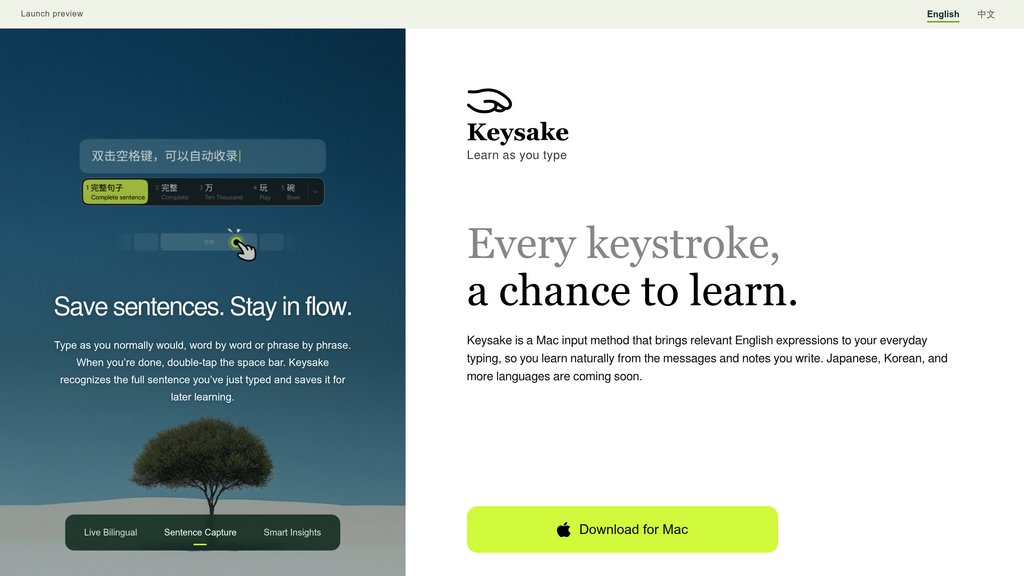
Keysake is a macOS input method editor built for Chinese speakers who want to pick up English without setting aside dedicated study time. As users type Chinese into any app, Keysake displays the corresponding English expression alongside it in real time, using Apple's on-device translation engine so keystrokes never leave the device. Whenever a phrase feels worth remembering, a quick double-tap of the spacebar saves it as a word, phrase, or full sentence into a personal collection, complete with grammar and usage breakdowns for later review. The tool is currently free and macOS-only, with Japanese and Korean support, plus an iOS version, on the roadmap.
Key Features
Ambient Bilingual Display
Shows English translations next to Chinese text as you type in any macOS application, no extra window or switching required.
On-Device Translation
Relies on Apple's built-in translation engine so nothing is sent to the cloud, keeping typed content private.
One-Tap Save
Double-tapping the spacebar instantly captures a word, phrase, or sentence into a personal vocabulary collection.
Grammar Breakdown in App
Saved expressions come with structural and usage explanations, letting users study the 'why' behind each phrase.
Personalized Study Material
Builds a learning set from the user's own daily conversations and work messages rather than generic textbook content.
Expanding Language Roadmap
Currently supports Chinese-to-English, with Japanese, Korean, and reverse English input planned for future releases.
Use Cases
- Passive Vocabulary Building : Professionals who chat and write in Chinese all day can absorb relevant English phrases without a separate study session.
- Workplace English Prep : Users drafting emails or messages for international colleagues can see natural English phrasing as they type in Chinese.
- Self-Paced Language Review : Learners can revisit saved words and sentences in the app to review grammar patterns drawn from their own real usage.
- Casual Conversation Practice : People texting friends or family in Chinese can naturally pick up how the same thought is expressed in English.
- Privacy-Conscious Learning : Users wary of cloud-based language apps get real-time translation help entirely on-device.
FAQs
Keysake Alternatives

Relingo
Language learning platform that transforms daily web browsing and video watching into personalized vocabulary acquisition through context-based immersion.

Ddict
Browser extension and web tool for instant translation and word lookup directly on any webpage, enhancing reading and language learning.

Dice la canción
Platform that reveals the hidden meanings and stories behind song lyrics, offering lyrics, translations, videos, and additional insights.

Duolingo Ninja
A Chrome extension that enhances Duolingo vocabulary learning by translating web content based on the user’s learned words.

GiveMeTranslator
AI-powered platform for building, using, and sharing custom online translators tailored to any style, language, or creative purpose.

PhraseClip
A browser tool that instantly translates highlighted words or phrases and builds a personalized vocabulary dictionary with examples and audio.

Polyglotta
Multilingual translation and learning platform enabling side-by-side translations across 70+ languages with integrated pronunciation, chat practice, and community-driven feedback.

有道翻译
Comprehensive neural machine translation platform supporting 109 languages with web, mobile, desktop, and hardware translator solutions.