
Dynobase
A professional and modern GUI client for DynamoDB that streamlines database management with advanced querying, visual modeling, and code generation.
Community:


Product Overview
What is Dynobase?
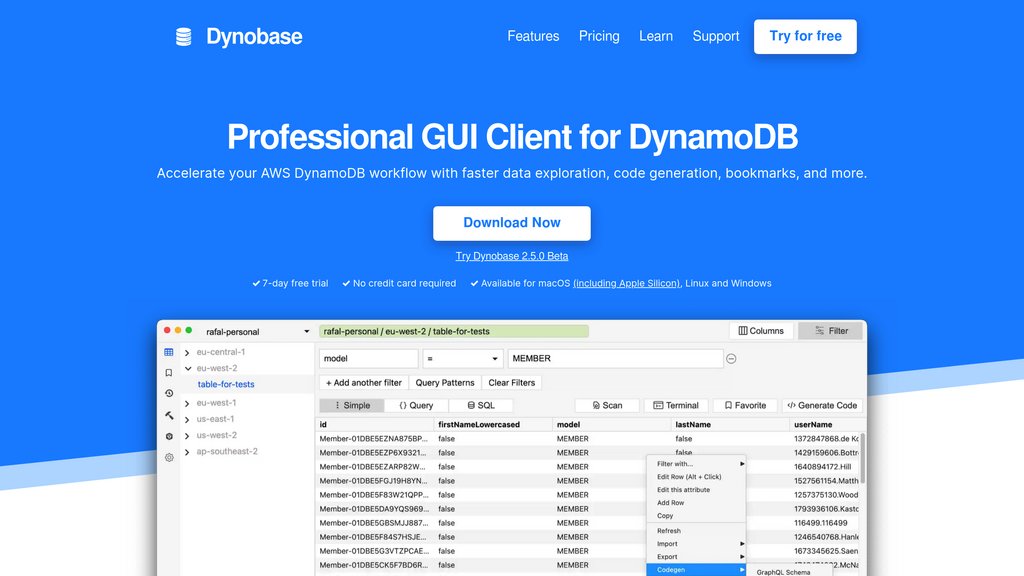
Dynobase is a powerful desktop application designed to simplify and accelerate workflows for developers working with Amazon DynamoDB. It offers a sleek, user-friendly interface for data exploration, query building, and table management across macOS, Windows, and Linux. Dynobase integrates seamlessly with AWS environments, supporting advanced features such as multi-tab browsing, bookmarks, history, and offline local DynamoDB instances. It enhances productivity by generating code snippets in multiple languages and providing a terminal for advanced data manipulation beyond native DynamoDB capabilities.
Key Features
Visual Query Builder
Construct and run DynamoDB queries and scans visually, reducing the need to write complex query syntax manually.
Automatic Code Generation
Generate ready-to-use code snippets in languages like TypeScript, JavaScript, Python, Go, Rust, and Bash for AWS SDKs, streamlining development.
Single-Table Designer
Easily model and visualize DynamoDB single-table designs with tools to infer models from existing tables and manage relational data.
Integrated Terminal
Manipulate and transform data using JavaScript within Dynobase, enabling advanced filtering, mapping, and aggregation beyond standard DynamoDB operations.
Multi-Platform Support
Available on macOS (including Apple Silicon), Windows, and Linux with offline support for DynamoDB Local and Localstack.
Enhanced User Experience
Features include multiple tabs, bookmarks, history, keyboard shortcuts, dark mode, and custom fonts for efficient and comfortable usage.
Use Cases
- DynamoDB Data Exploration : Quickly browse and filter large datasets with advanced search and sorting capabilities, improving data analysis efficiency.
- Application Development : Developers can generate SDK-ready code snippets and test queries, accelerating backend development and integration with AWS services.
- Data Modeling : Design and manage complex single-table DynamoDB schemas visually, reducing errors and improving maintainability.
- Operational Management : Create, delete, and purge tables; manage data imports/exports; and handle multi-factor authentication securely within one interface.
- Advanced Data Manipulation : Use the built-in terminal to perform custom data transformations and aggregations that go beyond DynamoDB’s native API.
FAQs
Dynobase Alternatives

Pylar
Secure data access layer for AI agents that enables controlled interaction with databases and business applications through governed SQL views and MCP tools.

GA4 SQL
A free, user-friendly tool that automates the generation of Google Analytics 4 BigQuery SQL queries without requiring SQL knowledge.

Datascale
AI-driven platform that automatically maps SQL data lineage and enables semantic search for data assets to enhance data understanding and governance.

SQLAI.ai
AI-powered multi-tool for generating, optimizing, explaining, and running SQL and NoSQL queries with high accuracy and ease.

Spice AI
A versatile platform that simplifies querying, federating, and accelerating data from multiple sources using SQL, enabling fast, data-grounded application and AI development.

ClickHouse
High-performance, open-source columnar database optimized for real-time analytical processing and large-scale data analytics.

Hex
Collaborative, AI-powered data workspace integrating SQL, Python, and no-code tools for end-to-end data analysis and visualization.

Navicat Premium
Comprehensive database management and development tool supporting multiple database types with advanced features for efficient data handling and collaboration.