
Cutback
Video editing assistant plugin for Adobe Premiere Pro that automates repetitive editing tasks including rough cuts, multi-camera synchronization, transcription, and subtitle generation.
Community:


Product Overview
What is Cutback?
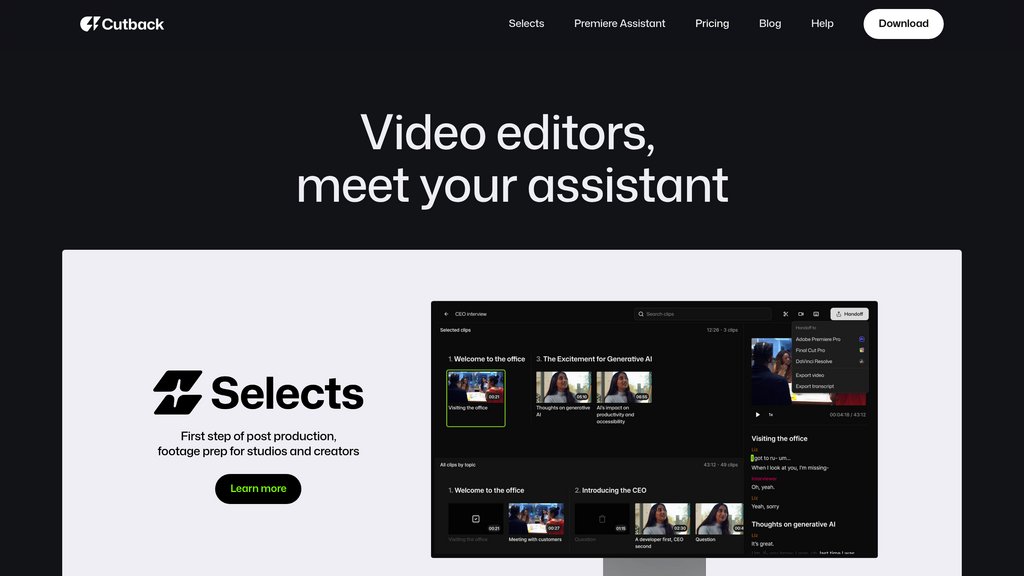
Cutback is an intelligent video editing assistant seamlessly integrated into Adobe Premiere Pro, designed to eliminate time-consuming manual editing tasks. The platform automates essential editing workflows including generating rough cuts from raw footage, synchronizing multi-camera projects, transcribing content in over 100 languages, and producing multilingual subtitles. By handling routine editing processes, Cutback enables creators, studios, and freelancers to focus on the creative aspects of video production while significantly reducing post-production timelines. The plugin simplifies footage preparation, allowing editors to work more efficiently within their existing Premiere Pro environment.
Key Features
Auto Rough Cut
Intelligently generates initial cuts from raw footage using conversational commands. Select best takes, remove unnecessary segments, identify highlights for short-form content, or cut based on specific timestamps and visual cues—transforming hours of footage into structured timelines in minutes.
Multi-Camera Synchronization
Automatically aligns multiple video tracks and manages audio switching based on speaker detection. Handles complex setups from single-person multi-camera recordings to multi-speaker interviews, potentially saving up to 90% of manual synchronization time.
Transcription & Text-Based Editing
Generates accurate transcriptions in over 100 languages with industry-leading accuracy benchmarks. Edit videos directly by modifying the text transcript, enabling faster identification and removal of unwanted sections without manual timeline scrubbing.
Translation & Subtitle Generation
Produces subtitles automatically in 29 languages with one-click translation, enabling global reach and accessibility for international audiences without additional post-production effort.
B-roll Search & Asset Integration
Search and insert copyright-free photos, videos, stickers, and GIFs directly into sequences from the plugin interface. Includes AI-powered image editing for background removal, text removal, retouching, and upscaling.
Content Summarization & Highlighting
Automatically analyzes and summarizes video content while highlighting key points as editing cues. Displays subtitles alongside video for precise cutting and efficient content navigation.
Use Cases
- Studio Production : Large production teams and studios can accelerate content workflows by automating footage preparation, multi-camera editing, and asset management across multiple projects and long-form content.
- Independent Creators : Individual content creators can reduce editing time from hours to minutes, enabling faster content production and more frequent publishing schedules while maintaining creative control.
- Interview & Podcast Production : Automatically handle multi-camera synchronization and speaker-based audio switching for interviews, podcasts, and talk show formats, eliminating tedious manual track management.
- Short-Form Content Creation : Extract highlights and create short-form clips from long-form footage automatically, streamlining the process of repurposing content for social media platforms.
- Multilingual & Global Distribution : Generate subtitle tracks in multiple languages automatically, enabling creators to produce internationally distributed content without external translation services or additional post-production work.
FAQs
Cutback Alternatives

FrameNet
Automated video creation platform enabling users to produce professional-quality videos with AI-assisted editing and subtitle generation tools.

蜜蜂剪辑
User-friendly video editing software with comprehensive editing tools and online capabilities for creators of all skill levels.

Capsule
AI-powered video editor designed to help content and marketing teams create branded videos 10x faster with real-time collaboration and brand consistency.

Wisecut
Wisecut is an intuitive video editing tool that transforms long videos into engaging clips by automatically removing silences, adding captions, and enhancing audio with background music.

Ozone.pro
Cloud-based video editing platform that streamlines content creation with AI-assisted tools and real-time team collaboration.

AutoCut
AI-powered plugin for Adobe Premiere Pro and DaVinci Resolve that automates repetitive video editing tasks to save time and enhance creativity.

Zeemo AI
AI-powered platform for automatic video captioning, multilingual subtitle generation, and video editing with dynamic visual effects.

Klap
AI-powered platform that automatically converts long-form videos into viral-ready short clips optimized for social media.