
Codebuff
Ferramenta CLI que automatiza tarefas de codificação ao compreender profundamente toda a sua base de código para gerar alterações precisas e contextualmente conscientes.
Comunidade:


Visão Geral do Produto
O que é Codebuff?
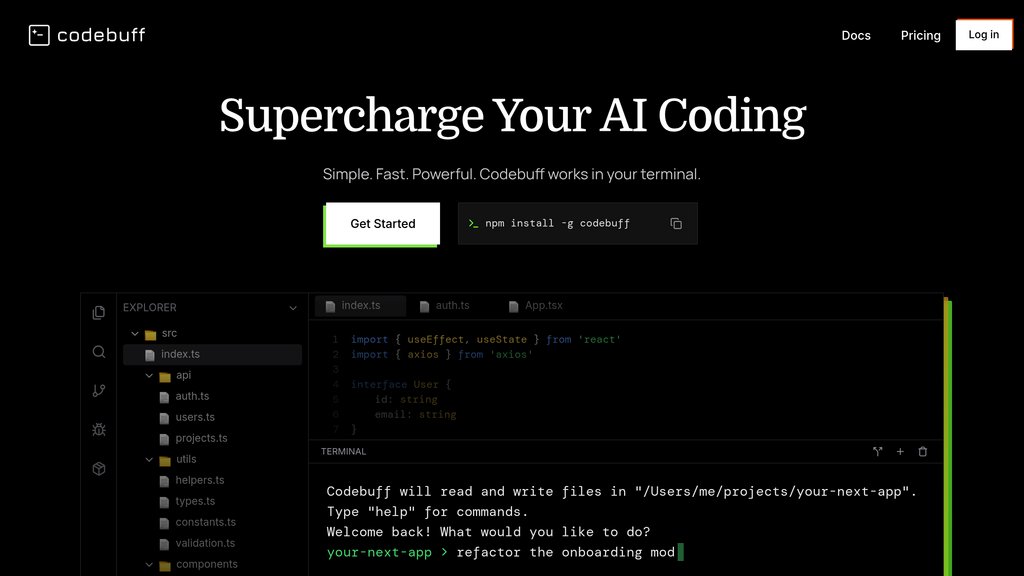
Codebuff é uma ferramenta de interface de linha de comando projetada para simplificar o desenvolvimento de software, interpretando instruções em linguagem natural e aplicando-as diretamente à sua base de código. Ele constrói um mapa abrangente do seu projeto, incluindo dependências e padrões, permitindo fazer edições precisas que respeitam o seu estilo de código existente e arquitetura. Ao integrar-se com seu terminal, pode criar, modificar e testar código em múltiplos ficheiros, executar comandos e instalar pacotes, tudo sem intervenção manual. O Codebuff aprende continuamente com o contexto do seu projeto através de ficheiros de conhecimento, melhorando sua eficácia ao longo do tempo e permitindo que os desenvolvedores se concentrem em design e arquitetura de nível superior.
Recursos Principais
Compreensão Completa do Código
Analisa e armazena em cache toda a estrutura do projeto e dependências para fornecer edições de código contextualmente precisas.
Interface de Linguagem Natural
Os utilizadores interagem através de comandos de texto simples no terminal, permitindo instruções de codificação intuitivas sem sintaxe complexa.
Edição Multi-ficheiro e Execução de Comandos
Edita simultaneamente múltiplos ficheiros e executa comandos de terminal como testes, linters ou instalações de pacotes.
Ficheiros de Conhecimento Adaptativo
Armazena notas em markdown legíveis sobre especificidades do projeto para melhorar a compreensão e personalizar a geração futura de código.
Independente da Stack Tecnológica
Funciona perfeitamente com qualquer linguagem de programação ou framework e integra-se com editores existentes como VSCode ou Vim.
Automação Escalável
Capaz de refinar iterativamente o código até que as condições especificadas sejam atendidas, suportando fluxos de trabalho de desenvolvimento complexos.
Casos de Uso
- Desenvolvimento de Funcionalidades : Estrutura e implementa rapidamente novas funcionalidades em bases de código grandes com codificação manual mínima.
- Refatoração de Código : Automatiza a reestruturação de código e alinhamento de estilo, preservando as convenções específicas do projeto.
- Geração de Testes Unitários : Cria e refina testes unitários em paralelo com o desenvolvimento de funcionalidades para garantir a qualidade do código.
- Automação de Builds : Executa comandos de terminal como testes, verificações de tipo e instalações de pacotes para otimizar pipelines de CI/CD.
- Integração no Projeto : Utiliza ficheiros de conhecimento para documentar a arquitetura do projeto e padrões de codificação, facilitando a colaboração em equipe e a adaptação de novos desenvolvedores.
Perguntas Frequentes
Alternativas ao Codebuff

GitButler
Um cliente Git moderno que permite trabalhar simultaneamente em múltiplos branches com gestão virtual de branches e workflows integrados assistidos por IA.

Void
Editor de código com IA open-source baseado no VS Code, oferecendo codificação assistida por IA com total privacidade de dados e integração flexível de modelos.

Trellis
Framework de IA tudo-em-um que permite Claude Code e Cursor entenderem sua base de código, aplicarem padrões de desenvolvimento e acelerarem entrega de funcionalidades.

Otty
Um emulador de terminal nativo acelerado por GPU construído para fluxos de trabalho de desenvolvimento modernos e integração perfeita de agentes de código.

Happy Coder
Cliente mobile e desktop gratuito e open source que permite executar e controlar o Claude Code remotamente, com criptografia de ponta a ponta e controle por voz em tempo real.

PearAI
Editor de código open-source com IA, integrando as melhores ferramentas para assistência de codificação e desenvolvimento de projetos.

JS2TS
Uma ferramenta online com IA que automatiza a conversão de JavaScript, JSON e CSS em TypeScript e formatos relacionados, aprimorando a qualidade do código e a eficiência do desenvolvimento.

CTOK
Plataforma de compartilhamento Claude Code custo-efetiva que permite múltiplos usuários dividirem despesas de assinatura premium através de agrupamento de contas.