
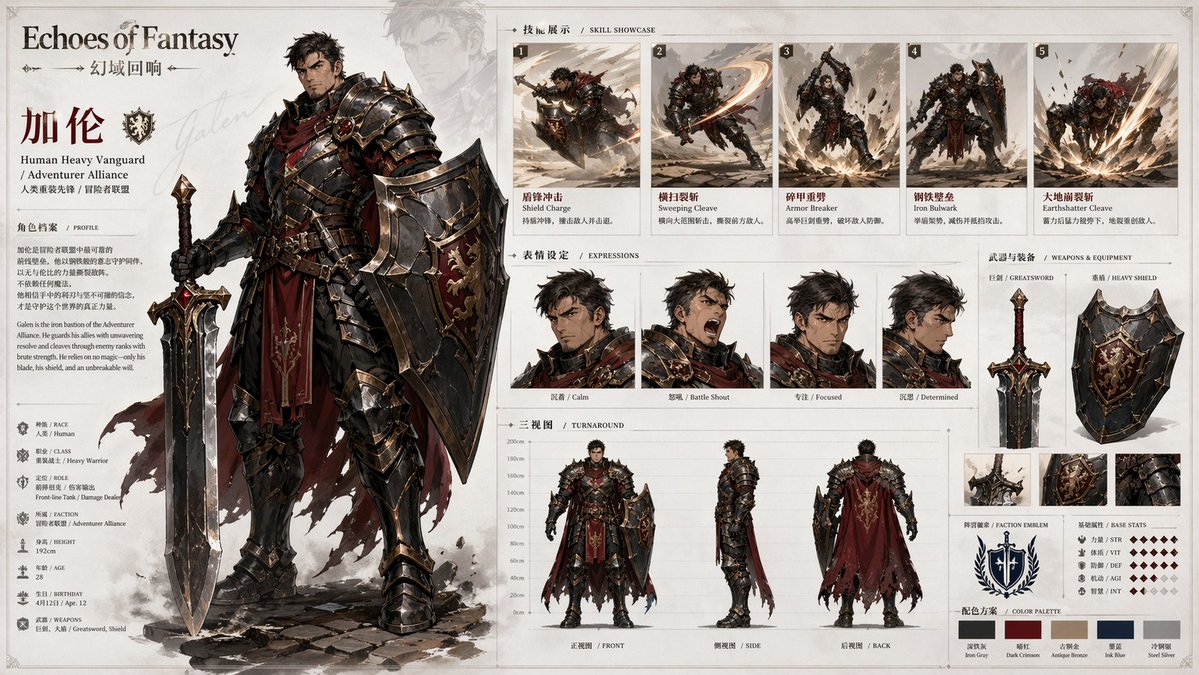
Based on [Theme / World / Character Setup], create a high-finish, highly consistent "Character Archive Board" suitable for serialized publishing. This is not an ordinary character illustration or a single key-art poster, but an official character design overview combining "main key art + skill action showcase + expression sheet + three-view explanation + weapon & equipment showcase + color palette + brand title system." The whole image should look like a standard display page from a game artbook, character profile page, project pitch board, or IP visual development document — with both character charisma and clear information organization. [Basic Setup] - Theme / World: [Theme] - Project / Brand name: [Brand] - Character name: [Name] - Identity / Class / Faction: [Identity] - Core temperament: [e.g., cold, elegant, valiant, wild, mysterious, fierce] - Combat role: [e.g., warrior, knight, mage, assassin, gunner, guardian] - Weapon type: [Type] - Element / Ability direction: [Ability] - Main color: [Color] - Secondary color: [Color] - Accent color: [Color] - Style direction: [e.g., anime game key art, light semi-painted character design, epic fantasy, futuristic sci-fi, oriental fantasy] - Aspect ratio: [recommended 3:2 landscape] [Auto-Completion Rule] If the user doesn't fill in everything or leaves fields empty, do not stop generating; instead automatically derive and complete a full, reasonable, unified character setup based on [Theme][World][Identity][Combat role][Weapon][Ability][Main color][Style]. When completing, prioritize and keep mutually consistent: gender tendency; age impression; body type; facial temperament; hairstyle and color; clothing structure; armor and accessory ratio; weapon appearance; skill effect form; expression tendency; clothing and equipment details in the three views. Auto-completion is not random patchwork but a unified scheme around the same positioning. The final character must have clear recognizability and match the world, class, palette, and combat style. [Auto-Combination Logic] 1. Set the overall direction by the [World]; 2. Decide body type, clothing structure, armor level, and weapon temperament by [Identity / Combat role]; 3. Decide skill actions, effects, combat posture, and equipment details by [Weapon / Ability]; 4. Decide clothing colors, weapon material, energy color, and visual identity by the [Colors]; 5. Unify face modeling, clothing language, lighting, and module presentation by the [Style]. Even with few keywords, generate a complete setup. E.g.: "fire knight girl" → age impression, cape, red/gold/black palette, lance or greatsword, fire effects, valiant expression; "ice prince" → blue/white/silver palette, light or ceremonial armor, longsword or scepter, ice-crystal skills, calm demeanor. [Layout Requirements] Landscape descriptive board layout, "main left, auxiliary right": 1. Main visual area (left): a large high-finish main key art as the visual core; complete pose, strong recognizability and charisma; clear details of clothing, armor, cape, patterns, accessories, weapon; clear class attribute and world belonging; possible faint background silhouette for depth without overpowering the subject. 2. Title & intro (top left): a large English title/series name; character name, subtitle, faction, class; a concise background intro text for a profile-page feel; clean, strong typography with brand visual system. 3. Skills area (top right): about 4–6 small skill-action images (dash, slash, cast, burst, ultimate, AoE); each keeps recognizable features and effect style; like an action breakdown. 4. Expressions area (center right): about 4 face expressions (calm, angry, surprised, pensive, smirk, eyes closed); unified with the main style. 5. Three-view area (bottom): front, side, back; explaining clothing structure, cape silhouette, armor design, back of hairstyle, footwear; regular, clear, unified, like a formal design sheet. 6. Weapon & extra setup (right): the main weapon shown separately, with breakdowns or multiple angles if needed; short weapon name and caption; optional faction emblem, element icon, character crest. 7. Color palette: 3–5 color blocks for the main scheme, consistent with clothing, weapon, and effect colors. [Visual Style] - Background mainly light gray-white, misty white, cool white; clean, restrained, plenty of whitespace. - The vibe of an official artbook / game profile page / spec board. - Combines refined illustration with rational layout and a manual-like feel. - Clear module borders, defined alignment, logical information zoning. - Detailed subject; expressions, actions, weapons, and three views unified in style. - Clean lighting, not overly realistic or heavy. - Keep it light-UI, modern, branded, pitch-like. - Not a chaotic collage nor an overly flashy poster. [Output Goal] Generate a serialization-reusable character archive board where the viewer instantly grasps the character look, class positioning, skill style, equipment features, and world belonging. It must have both "strong visual appeal" and "high information organization." [Execution Principles] - If fully filled, faithfully execute the user's setup; - If partially filled, complete the missing fields; - If very sparse, auto-combine a complete setup; - Whether manual or automatic, the final character must have unified, complete, serially expandable visual logic.