
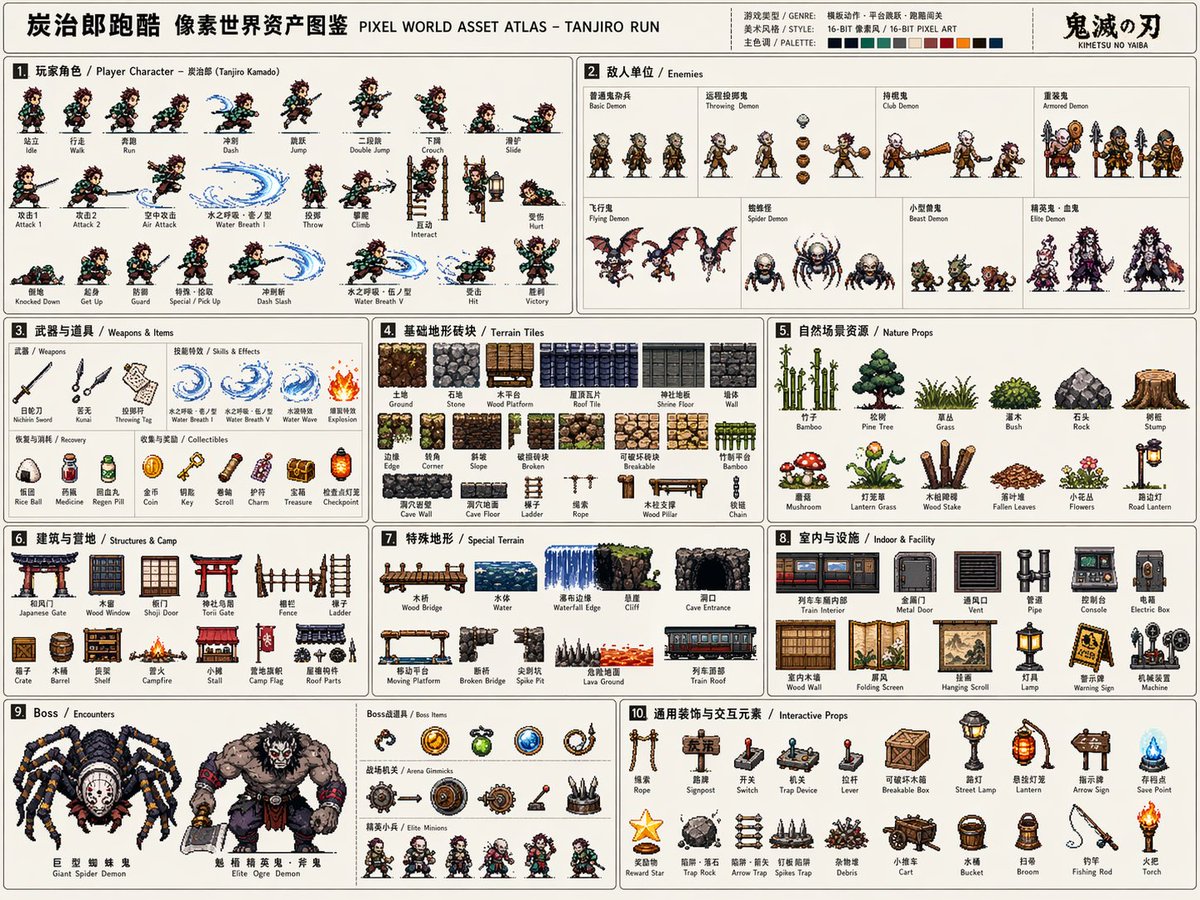
Based on the【game theme:】, create a high-completion, high-information-density «Pixel World Asset Atlas» suitable for serialized publishing. This is not an ordinary pixel illustration, nor a single game scene, but a «2D pixel game asset overview» aimed at game development, art design, level design and visual proposals. The image should look like a complete asset explanation board, systematically organizing in one image the core characters, enemies, items, terrain, scenes, gimmicks, bosses and decorative elements needed for a【game type】, forming a clear, professional, reusable game asset atlas. 【Basic settings】 Thematic world:【game theme】 Game type:【game type, e.g. side-scrolling action / platformer / dungeon adventure / survival / ARPG】 Era:【era】 Protagonist identity:【protagonist identity】 Enemy type:【enemy type】 Main scene:【main environment】 Overall style:【style direction, e.g. 16-bit retro arcade pixel / 32-bit refined pixel / modern indie pixel】 Main color:【main color】 Accent colors:【accent colors】 Highlight colors:【highlight colors】 Aspect ratio:【aspect ratio, horizontal 4:3】 If left blank, automatically match the optimal solution to the game theme. 【Overall image requirements】 Use a large horizontal canvas with a light or low-interference background, overall like a game development asset sheet, a pixel design-book spread, or a manual-style resource catalog. All elements should be 2D pixel art sprites of uniform pixel density, with clear black or dark outlines, a limited palette, and retro game texture. Do not generate realistic photographic style, 3D render style, thick-paint illustration style, or movie poster style. The focus is «complete system, clear classification, rich resources, strong development feel». 【Layout structure】 Use a modular grid layout, separating the different resource areas with thin lines. Each area needs a numbered title and a short category label; the overall reading path goes left to right, top to bottom. The layout should have the order of a manual, game development document, asset atlas and design board. Information density should be high but not chaotic; elements within each module should be evenly spaced and remain legible. 【Required modules】 1. Player character module: show the full action frames of the【protagonist identity】, including standing, walking/running, jumping, crouching/downed, attacking, throwing, climbing/interacting, hurt or special actions. The frames should be arranged horizontally, like a game sprite sheet. 2. Enemy unit module: design multiple enemies per the【enemy type】, including normal enemies, ranged enemies, heavy enemies, special units, animal/monster/mechanical units, plus hit or downed states. 3. Weapons & items module: show theme-matching melee weapons, ranged weapons, throwables, bullets/projectiles, explosion/skill effects, collectible rewards, supplies, keys or special items. 4. Basic terrain tile module: show ground, walls, platforms, edges, corners, damaged tiles, destructible tiles, and tiles of different materials for building levels. 5. Natural/outdoor scene resource module: per the【main environment】, show trees, grass clumps, stones, shrubs, stumps, obstacles and environmental decorations. 6. Building/base/camp resource module: show doors, windows, walls, fences, ladders, crates, barriers, barbed wire, shelves, camp facilities or thematic architectural parts. 7. Special terrain module: show bridges, water bodies, cliffs, cave entrances, mountains, towers, platform structures, hazardous terrain or thematic environmental changes. 8. Indoor/underground/facility resource module: show pipes, consoles, metal doors, vents, electrical boxes, mechanical equipment, warning signs, wall devices and indoor decorations. 9. Boss/encounter resource module: show one or more large bosses, special vehicles, giant gimmicks, boss-fight items, elite minions and iconic combat elements. 10. General decoration & interactive element module: show ladders, ropes, signs, street lamps, switches, gimmicks, destructibles, small tools, signboards, rewards and miscellaneous decorations. 【Visual detail requirements】 All resources should keep a uniform pixel-size logic and world consistency. Characters, enemies, items, terrain and scene resources should have clear proportional relationships, looking like they come from the same game project. Each small element should have a clear outline and not blur into a blob. Action frames should show continuity; terrain tiles should look tileable; items and gimmicks should be functionally recognizable; boss elements should be larger and more imposing than normal units. 【Text & label requirements】 A small amount of Chinese or English category titles is allowed, such as «1. Player Character», «2. Enemies», «3. Weapons & Items», etc. Text should exist as explanatory labels, concise in style, not stealing the spotlight. Titles and numbering should reinforce the feel of a data sheet, manual and game asset catalog. 【Final effect】 The final image should look like a complete pixel game asset atlas of the【thematic world】, combining the charm of retro game art with the systematic feel of a professional development data sheet. Overall it should be clear, rich, with complete modules and clear classification, suitable for game design showcases, serialized content publishing, visual proposals and future development reference.